Issue 4 of Agentic Engineering in Action
You can't tune what you can't see: prompt‑cache observability for GitHub Copilot with OpenTelemetry
Originally published on LinkedIn: read the original ↗
Contents
Open VS Code, ask Copilot Chat one question, and if you crack open the debug view you can watch prompt‑cache tokens tick past for that single call. That’s exactly enough visibility for one developer, on one machine, for one prompt. It stops being enough the moment you want to answer a sharper question:
Is our Copilot usage actually efficient — and can I prove it across more than one editor?
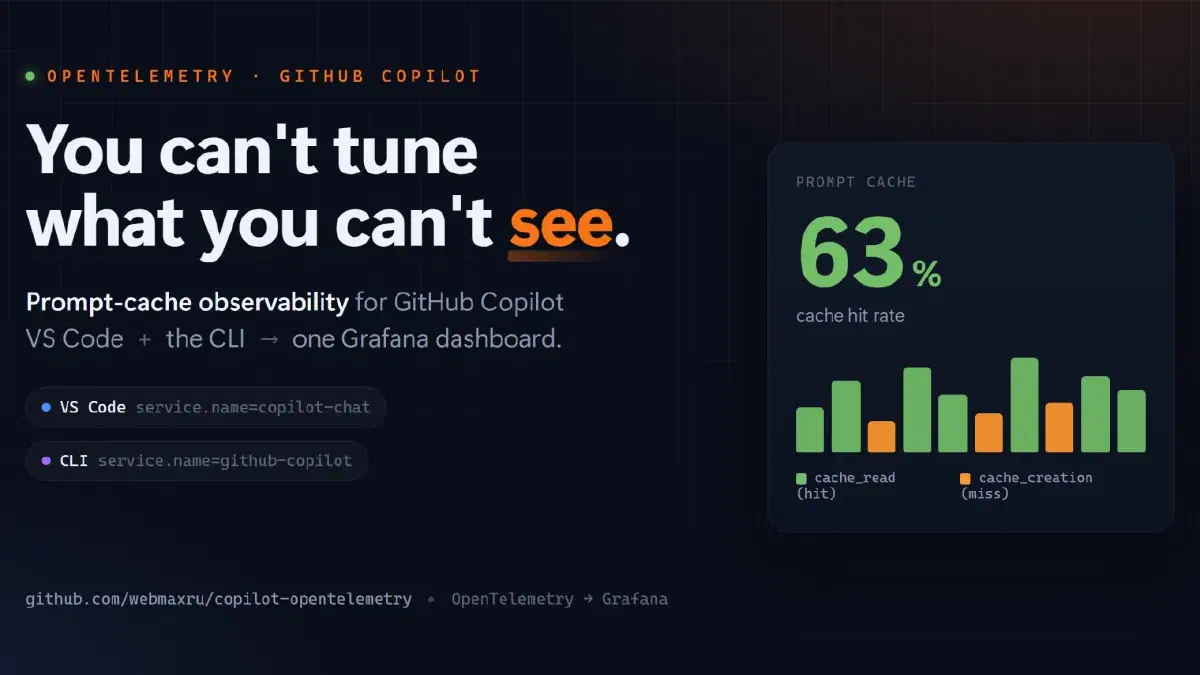
This article supported by copilot-opentelemetry repo is a hands‑on experiment that turns GitHub Copilot’s OpenTelemetry signals into a dashboard you can read at a glance — with prompt‑cache hit rate as the headline metric. It’s honestly scoped to the surfaces that actually emit OpenTelemetry today (VS Code and the Copilot CLI), and it covers three things that matter in practice: exactly what you can monitor, a straight‑talking data‑privacy section, and a “why would I bother” for the individual developer.
First: yes, GitHub already has a dashboard
If you administer Copilot you may already know the GitHub Copilot usage metrics dashboard — GitHub’s built‑in Copilot “AI insights.” It’s genuinely useful, and it answers a different question than this project.
GitHub’s dashboard is built for adoption and ROI, aggregated at the org/enterprise level over 28‑day trends: active users, suggestions accepted, acceptance rate, lines of code, breakdowns by language / IDE / model, and how Copilot moves PR throughput and time to merge — plus an NDJSON export and a Copilot Metrics API. It even draws on both IDE and Copilot CLI telemetry. It’s the right tool for “is my organization adopting Copilot, and is it paying off?”
What it doesn’t show is the inside of each interaction. It’s aggregated (not per‑request), GitHub‑hosted, and usually gated behind an org‑metrics permission — so there’s no prompt‑cache hit rate, no per‑request token counts, no time‑to‑first‑token or per‑model latency, no tool spans, and no way to point it at your own store, wire your own alerts, or redact fields on your terms.
That’s exactly the gap OpenTelemetry fills — the two are complementary:
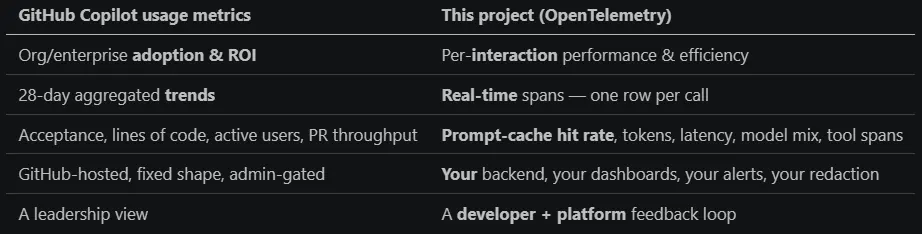 GitHub Copilot usage metrics + OpenTelemetry
Use GitHub’s dashboard to prove adoption to your VP; use this to actually tune the thing — live, on your own terms. The rest of this piece is about the second one.
Why bother? What OpenTelemetry (OTel in short) really gives you
Before the architecture, the motivation — because “set up observability” sounds like a chore until you see what it answers.
For you, the individual developer:
- Find out if caching is even working for you. A high cache‑hit rate means Copilot is fast and cheap for your prompts. A low one means your prompt prefix keeps drifting — and now you can see it drop the moment it happens (after you reordered tools, changed a system message, or added a volatile workspace hint).
- Stop guessing why Copilot “feels slow.” Time‑to‑first‑token and per‑model latency are right there. Is it the model? A specific tool? A giant context? You’ll know.
- Understand your own model mix and tool usage. Which models you actually hit, which tools dominate, where the time goes.
- Tune your prompts and custom instructions with a feedback loop. Change something, watch the hit‑rate and latency respond. That’s the difference between cargo‑culting prompt tips and measuring.
For a team or platform group:
- A fleet view instead of anecdotes — cache efficiency, cost, and adoption across developers and surfaces, sliced by model.
- Catch regressions early — a config or extension change that tanks caching shows up as a trend, not a support ticket.
- Prove the investment — accepted edits, lines of code, edit survival, PRs opened. Real outcome signals, not vanity counts.
The payoff‑to‑effort ratio is the hook: docker compose up -d (docker-compose.yml), four settings, five minutes and you have it locally, free, offline.
Reality check: which Copilot surfaces even emit OpenTelemetry?
“Monitor all of Copilot” is a promise the platform doesn’t fully keep yet. The honest map (mid‑2026):
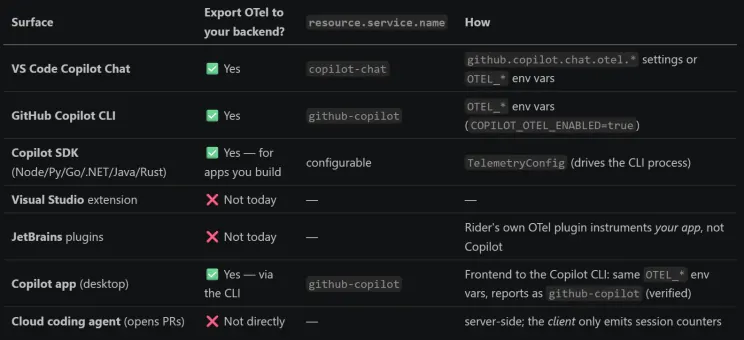 OpenTelemetry in GitHub Copilot
So this experiment covers VS Code (copilot-chat) and the CLI (github-copilot) — the two you can actually collect from (the desktop Copilot app is a frontend to the CLI and reports as github-copilot too) — plus the SDK for anything custom you build.
The insight: two surfaces, one vocabulary
Both surfaces emit OpenTelemetry using the GenAI semantic conventions, so the important attributes are identical — and they differ in exactly one thing, resource.service.name:
- VS Code Copilot Chat → copilot-chat
- GitHub Copilot CLI → github-copilot
That single difference becomes a dashboard variable, turning two data streams into one board with a selector: VS Code, Copilot CLI, or both. Unifying editor and terminal telemetry isn’t a data project — it’s a dropdown. Keep OTEL_SERVICE_NAME unset so each surface keeps its distinct name.
What you can actually monitor
This is the part people underestimate. Copilot emits traces, metrics, and events — here’s the real inventory, and the question each piece answers.
Traces — a span tree per interaction
invoke_agent copilot            ← the whole run
  ├── chat gpt-4o               ← one LLM call (cache tokens live here)
  ├── execute_tool readFile     ← one tool call
  └── chat gpt-4o
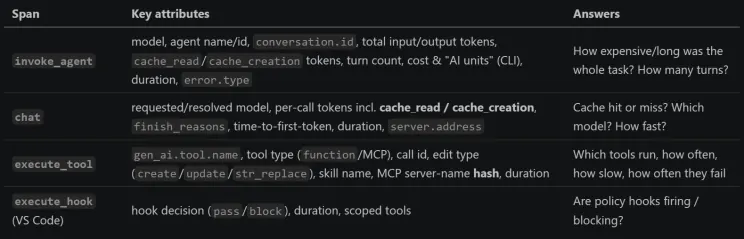 What you can actually monitor
Metrics
- gen_ai.client.operation.duration — LLM call & agent duration (histogram)
- gen_ai.client.token.usage — token counts by type (input/output)
- time_to_first_token / time_to_first_chunk / time_per_output_chunk — responsiveness
- tool call count & duration, agent turn count, session count
- Agentic outcome metrics (VS Code, across surfaces) — the “is it paying off” data: edit acceptance (accept/reject), lines of code added/removed by accepted edits, edit survival (does AI code stick around, 4‑gram & no‑revert scores), user actions (copy/insert/apply/followup), thumbs up/down feedback, pull requests created (CLI), cloud/remote agent sessions and PR‑ready notifications.
Events
Session lifecycle and interaction events: session.start, per‑tool tool.call, per‑turn agent.turn, edit accept/reject and hunk actions, inline‑chat done, edit‑survival samples, user feedback, and cloud session dispatch. The CLI adds span events for hook start/end/error, context truncation/compaction, skill invoked, and session shutdown (with premium‑request count, lines added/removed, files modified) and abort.
Put differently — the questions you can now answer
- Cache efficiency: hit vs miss, per model, per surface, over time.
- Cost & tokens: input/output/cached tokens, cost, AI units.
- Latency: duration and time‑to‑first‑token by model.
- Model mix: which models, how often.
- Tool usage & reliability: top tools, latency, failures, MCP vs built‑in.
- Agent shape: agent vs single‑shot, turns per session, tools per run.
- Adoption & outcomes: edits accepted, lines shipped, edit survival, thumbs, PRs.
- Reliability: errors, stuck/aborted sessions, context compaction.
The architecture: two surfaces × four backends
Here’s the part that makes this practical: what you instrument and where you look at it are decoupled. The two surfaces always emit the same OTLP over the same GenAI conventions, so where that telemetry lands is a swappable choice, not a rewrite. This repo ships four interchangeable backends, and moving between them never touches Copilot’s configuration — only the export target:
- Start on a laptop with a local Grafana + Tempo stack (Option A) — $0, offline, nothing leaves your machine.
- Add Azure by putting an OpenTelemetry Collector in front of Application Insights — either running locally (Option B) or as a scale‑to‑zero Azure Container App (Option C) — which also gives you one place to redact.
- Skip infrastructure entirely and point both surfaces straight at Grafana Cloud’s free tier (Option D).
Same instrumentation, same dashboard, same surface selector — you pick the backend that fits where you are today and change your mind later by editing a single endpoint.
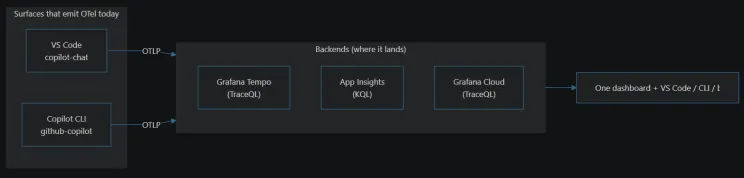 The architecture: two surfaces × four possible backends
 Different backend architectures
A/D are “direct” (editor/CLI → backend). B/C put a collector in the path — which, as you’ll see in the privacy section, is also your redaction control point.
Turning it on: one env block covers both surfaces
VS Code — four User settings.json keys (must be User, not Workspace — the SDK inits too early):
{
  "github.copilot.chat.otel.enabled": true,
  "github.copilot.chat.otel.exporterType": "otlp-http",
  "github.copilot.chat.otel.otlpEndpoint": "http://localhost:4318",
  "github.copilot.chat.otel.captureContent": false
}
The Copilot CLI reads the same OTEL_* env vars, so for a cloud backend you set them once and both surfaces report:
setx OTEL_EXPORTER_OTLP_ENDPOINT "https://otlp-gateway-<zone>.grafana.net/otlp"
setx OTEL_EXPORTER_OTLP_HEADERS  "Authorization=Basic <base64>"
setx COPILOT_OTEL_ENABLED        "true"
# Do NOT set OTEL_SERVICE_NAME — keeps VS Code=copilot-chat, CLI=github-copilot for the selector.
Env vars only reach newly launched processes: open a fresh terminal, echo to confirm, then run copilot.
This particular demo runs on Grafana Cloud (Option D)
For the walkthrough I use Option D — Grafana Cloud, because it’s the fastest path to a shareable, hosted dashboard with nothing to run locally and on the free tier. Everything below works the same on A/B/C — only the endpoint changes.
Create a stack. Sign up at grafana.com and create a stack — a managed Grafana with a built‑in Tempo trace store. Its free tier is plenty to follow along.
Grab the OTLP endpoint + token. In your stack, open Connections → Add new connection → OpenTelemetry (OTLP). It shows your OTLP endpoint (https://otlp-gateway-<zone>.grafana.net/otlp) and lets you generate an API token; Grafana hands you the ready‑made Authorization=Basic <base64(instanceID:token)> header. Those are exactly the two values in the setx block above — set them once and both VS Code and the CLI start shipping traces to the cloud.
Import the dashboard. In Grafana, go to Dashboards → New → Import, then upload dashboard configuration (or paste its contents). When prompted, select your Tempo data source and click Import. The board comes up with the Copilot surface selector already wired — All (VS Code + CLI), VS Code, or Copilot CLI — so it works the moment data arrives.
Give it a minute after your first Copilot interaction and traces start landing — no collector, no Docker, nothing else to stand up.
What you see
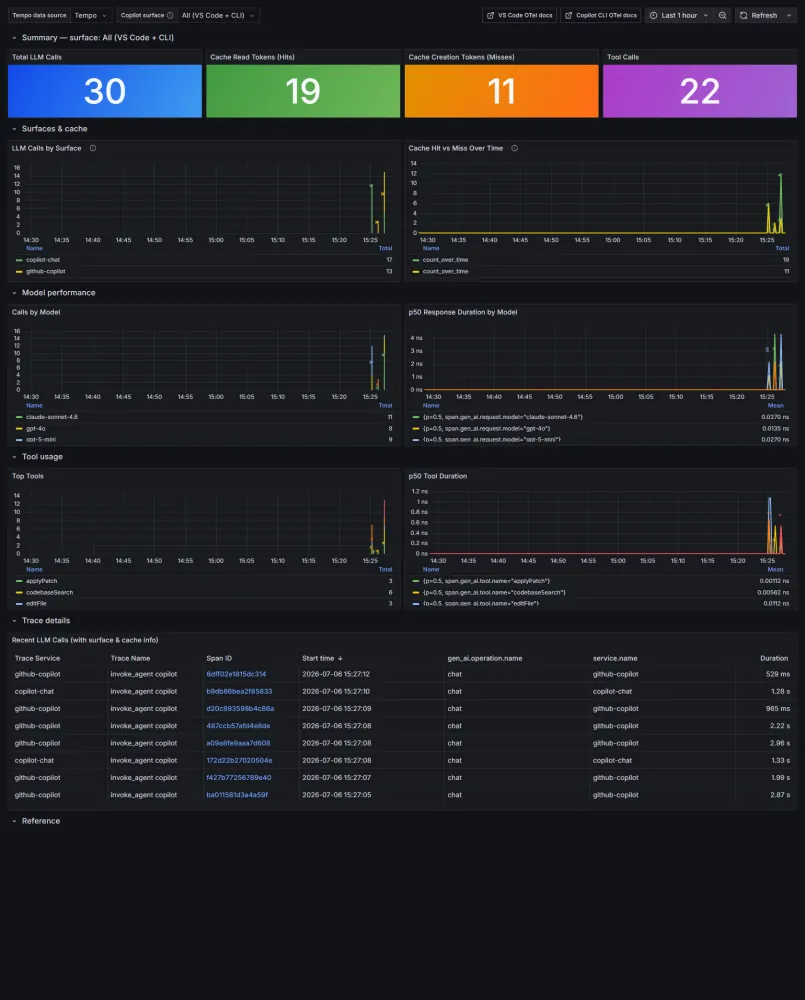 The All (VS Code + CLI) view — cache hit/miss, calls by surface, models, tools, and a trace table.
The Copilot surface selector maps to one filter that means the same thing on either backend:
- TraceQL: { resource.service.name =~ “$surface” } | count_over_time() by (resource.service.name)
- KQL: dependencies | where cloud_RoleName matches regex ‘$surface’ | summarize count() by cloud_RoleName
Why prompt‑cache hit rate is the number
- Leading indicator of prompt stability — a falling hit rate means a prefix drifted before anyone files a “Copilot feels slow” ticket.
- Directly tied to cost and latency — cache reads are cheaper and faster than rebuilding a prefix.
- Turns a feeling into an argument — “the CLI’s hit rate on claude-sonnet-4.6 dropped 30% after Tuesday’s change; which prompt shape did we destabilize?” has an answer.
Data privacy: what leaves your machine (and where it goes)
This is the question that decides whether you can actually roll this out. The short version is reassuring; the details matter.
- OTLP export goes to your endpoint — not to GitHub
Enabling OpenTelemetry export does not send more data to GitHub or Microsoft. It routes telemetry to the OTLP endpoint you configure — your local Tempo, your Application Insights, your Grafana Cloud stack. (Copilot’s normal product telemetry to GitHub is a separate thing, governed by your GitHub/enterprise settings and Trust Center — unchanged by any of this.) So the real question is simply: what does my backend receive?
- By default, no prompts, no code, no responses
Content capture is off by default — a deliberate choice in the OpenTelemetry GenAI conventions, because model inputs routinely contain PII and confidential code (GDPR/HIPAA territory). With the default:
- Not sent: prompt text, model responses, system prompts, tool arguments/results, tool schemas, file paths, shell command strings.
- Sent (metadata only): operation type, model name, token counts (incl. cache), durations/TTFT, finish reasons, tool names, error types, opaque session/conversation IDs.
- The metadata that is sent — know these two
Even with content off, a couple of attributes are identifying and worth a conscious decision:
- VS Code attaches repository context by default: github.copilot.git.repository (remote URL), git.branch, git.commit_sha, and github.copilot.github.org. Not your code — but it reveals which project and which org. Relevant if you ever run Copilot in a customer or internal repo.
- The CLI attaches enduser.pseudo.id — a pseudonymous user identifier (not your name/email).
- Nice touch: MCP server names are already SHA‑256 hashed in tool spans.
- Turning content capture on — do it deliberately
Flip captureContent (VS Code) or OTEL_INSTRUMENTATION_GENAI_CAPTURE_MESSAGE_CONTENT=true (CLI) and the traces gain full prompts, responses, system prompts, tool schemas, and tool args/results. That’s powerful for debugging your own prompts and a liability for anyone else’s. Only enable it against a trusted, access‑controlled backend you own, never a shared SaaS.
- Where the data physically lives (residency)
- A — Local: never leaves your laptop.
- B / C — Application Insights: your Azure region (pick an EEA region like Sweden Central / Norway East for EU residency), under your Azure RBAC.
- D — Grafana Cloud: Grafana Labs’ SaaS, in the region of your stack (a third party).
- The collector is your redaction control point
Direct paths (A local, D Grafana Cloud) send whatever the client emits — there’s nothing in between. The collector paths (B, C) let you scrub before anything leaves. In the OTel Collector you can drop or hash attributes:
processors:
  attributes/redact:
    actions:
      - key: github.copilot.git.repository   # drop repo URL
        action: delete
      - key: github.copilot.github.org       # drop org
        action: delete
      - key: enduser.pseudo.id               # or hash instead of delete
        action: hash
Add it to the traces pipeline and the git/org identifiers never reach your backend. (The redaction and transform/OTTL processors give you regex‑based masking if you go further.)
Practical privacy checklist
- ✅ Keep captureContent off unless you own the backend and control access.
- ✅ Prefer a collector path (B/C) for teams so you can redact github.copilot.git.* / org and hash user ids.
- ✅ Choose an EEA Azure region if residency matters; know that D sends to a third‑party SaaS.
- ✅ Treat the OTLP endpoint token as a secret (env var, not committed; rotate if leaked).
- ✅ Remember OTLP export is additive to your own stack, not extra data to GitHub.
- ✅ For fleets, push config via Intune pointed at a central collector that redacts — so policy is enforced, not per‑developer trust.
From laptop to fleet
- Prove it locally (A): docker compose up -d, paste the settings, use Copilot, open :3001.
- Add a backend (B/C/D) for persistence and an org‑wide view.
- Enforce with Intune: push the settings / OTEL_* env vars to managed devices, pointed at a shared (redacting) collector. Telemetry stops being opt‑in; both surfaces report automatically.
When another surface adopts the same conventions — a JetBrains plugin or Visual Studio — it slots into the selector: a new service.name, a new option. Until then, the dashboard shows exactly what’s instrumented, and no more. That honesty is a feature.
The takeaway
Observability for AI‑assisted coding isn’t a new discipline — it’s the same OpenTelemetry story we’ve told for services, aimed at a new audience. Two observations do the heavy lifting: VS Code and the Copilot CLI already speak the same GenAI vocabulary, and the one attribute separating them is the one you turn into a dropdown. Everything else is counting cache hits — safely, on your own terms, with prompts and code staying exactly where you decide.
Try it: the full experiment (Docker Compose for local, Azure and Grafana Cloud setups, both surface‑aware dashboards, and the redaction snippet above) is on GitHub — clone it, docker compose up -d, and you’ll have VS Code and the CLI on one board in about five minutes.
Appendix: pick a backend
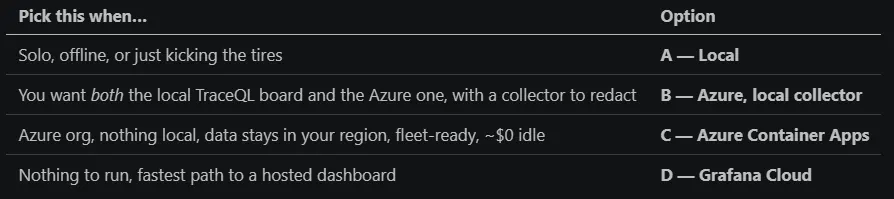 Architecture decision guide
You’ve instrumented services this way for years. Your team now leans on Copilot every day — its cache hits quietly shaping both your bill and your latency. So: do you actually know your prompt‑cache hit rate this week — or are you still tuning what you can’t see?